# Overview
## What is EthStorage
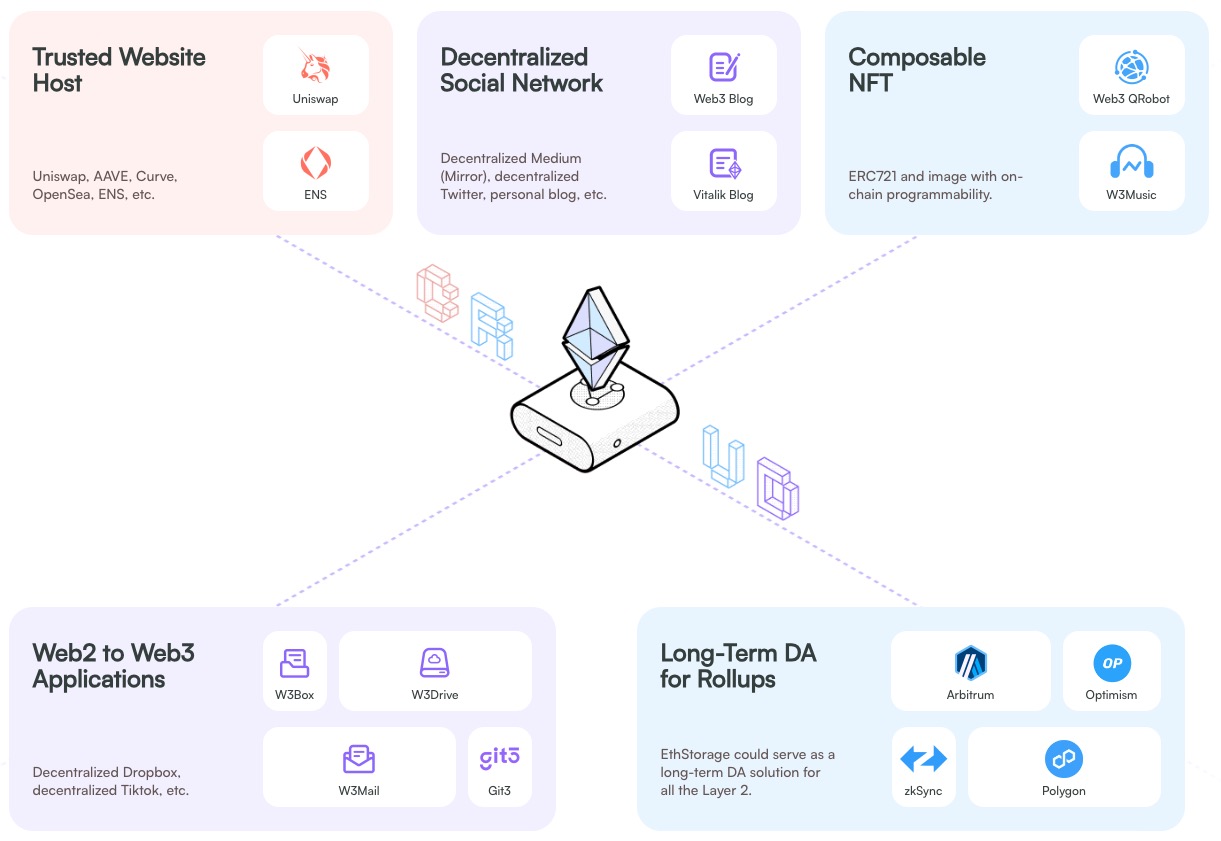
EthStorage is a modular and decentralized storage Layer 2 that offers programmable key-value storage powered by DA. It enables long-term DA solutions for Rollups and opens up new possibilities for fully on-chain applications like games, social networks, AI, etc.
## Motivation
The main motivation behind EthStorage is to provide a long-term DA based on Ethereum.
EIP-4844 introduces data blobs that enhance the throughput and efficiency of L2 scaling solutions like rollups. However, the blob data is only available temporarily, meaning it will be discarded in a few weeks. This has generated a significant impact: the inability of L2 to unconditionally derive the latest state from L1. If a certain piece of data can no longer be retrieved from L1, a rollup may not be possible to sync the chain.
With EthStorage as a long-term DA solution, L2s can derive from their DA layer (Ethereum DA, Celestia, EigenDA, etc. + EthStorage) any time they want.
EthStorage also opens up new possibilities for fully on-chain applications like games, social networks, AI, etc.
# Key Terms
## Ethereum DA
Layer 2 scaling solutions, such as rollups, reduce transaction costs and increase Ethereum's throughput by processing transactions off-chain and then posting them to the Ethereum mainnet in compressed batches. To Ethereum, the data availability problem is the need to prove to the whole network that these summarized form of transaction data really represents a set of valid transactions.
## Danksharding & EIP-4844
Danksharding is the full realization of the rollup scaling that will bring massive amounts of space on Ethereum for rollups to dump their compressed transaction data. EIP-4844 (a.k.a. Proto-Danksharding), as an intermediate step, introduces data blobs that can be sent and attached to blocks. The data in these blobs is not accessible to the EVM and is optionally deleted after a fixed period, which offers a more cost-effective solution compared to storing the data in calldata.
## Shard
As the entire storage dataset can be potentially huge, it is evenly divided into multiple fixed-size partitions that are consecutively numbered, known as shards. Each shard contains non-overlapping data with independent mining parameters within the storage contract.
A shard is sized appropriately so that it can be hosted by a home computer, e.g., 512GB or 1TB.
# How EthStorage Works
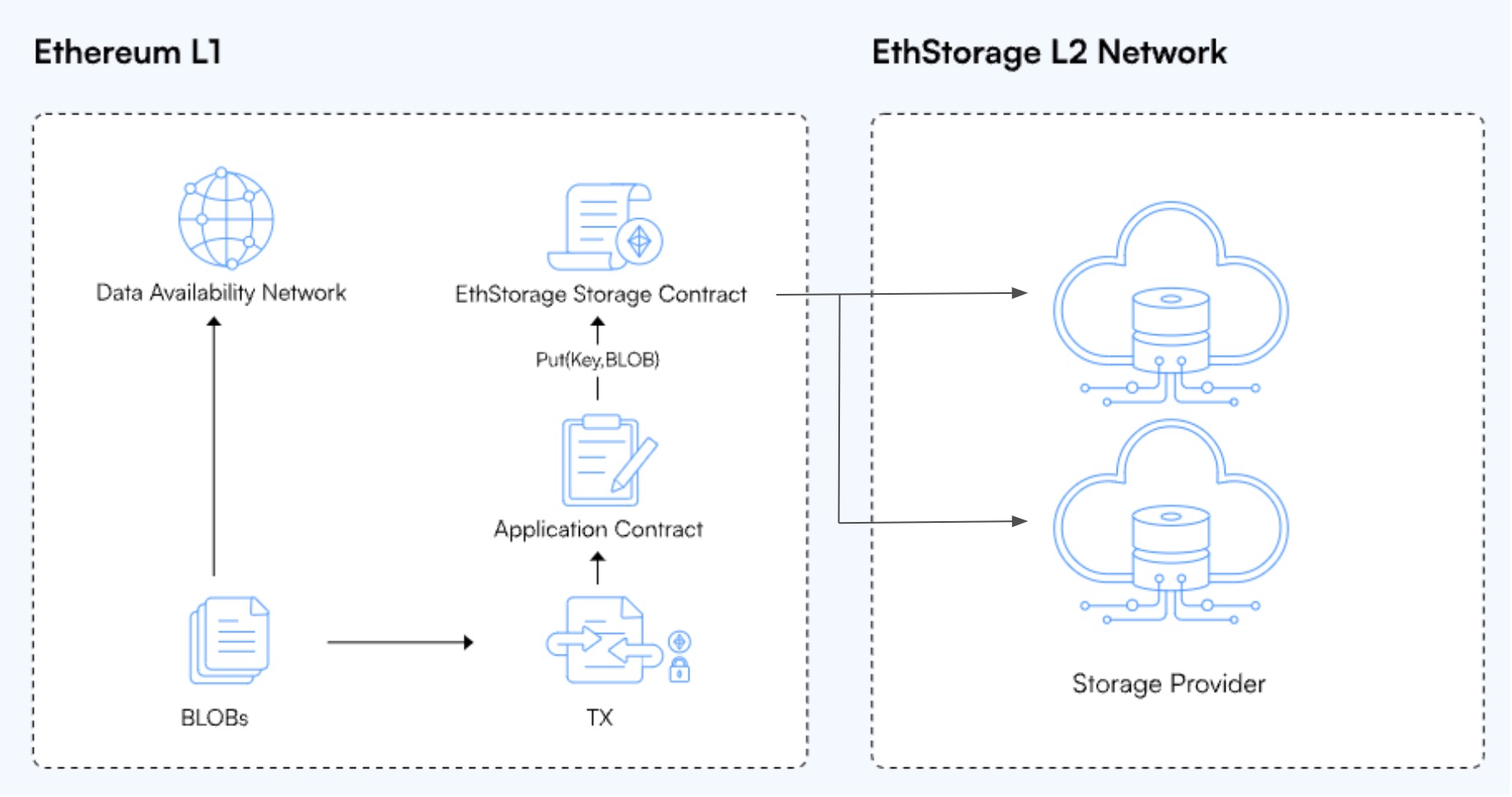
The EthStorage network consists of two main components:
1. A storage contract deployed on the Ethereum L1 responsible for on-chain fee distribution and Proof of Storage verification.
2. An L2 storage network composed by es-nodes, responsible for off-chain data storage replicas and prove via continuous DA sampling.
This is a rough overview of how it works:
## Step 1/5
Users upload their data to an application contract, which then interacts with the EthStorage contract to store the data.
step 1/5
## Step 2/5
In the EthStorage L2 network, storage providers receive notifications about data awaiting storage.
step 2/5
## Step 3/5
Storage providers download data from the Ethereum data availability network.
step 3/5
## Step 4/5
Storage providers submit storage proof to L1, proving a substantial number of replicas in the L2 networks.
step 4/5
## Step 5/5
The EthStorage contract rewards the storage provider who successfully submits the storage proof.
step 5/5
# Overview FAQ
### What's the difference between EthStorage and other decentralized storage such as IPFS, Filecoin, and Arweave?
The key distinction between EthStorage and other decentralized storage options like IPFS, Filecoin, and Arweave is its seamless integration with Ethereum, enhancing the development experience for builders within the Ethereum ecosystem.
With EthStorage, there are no additional tokens involved besides ETH, no need for extra wallets to be installed, and no learning curve for new technology stacks beyond Ethereum. Users and developers can reuse various tools from the Ethereum ecosystem, including Metamask, Solidity, Hardhat, and more. As the user base and developer community expand, the network effects of Ethereum are strengthened, enabling seamless interactions between EthStorage and other applications across the ecosystem.
Additionally, EthStorage offers a programmable dynamic storage interface, whereas alternative options provide static storage solutions. Specifically, EthStorage offers a CRUD (create, read, update, delete) interface, enabling operations on a key-value store (KV-store), where each value is referred to as a blob.
### What sets EthStorage apart from other DA solutions like Celestia, Avail, and EigenDA?
While Celestia, Avail, and EigenDA serve as alternative DA solutions to Ethereum, the main distinction lies in EthStorage's long-term storage capability within the Ethereum ecosystem, unlike the others. For instance, Celestia only retains data for 1-3 months, and EigenDA for just 14 days.
It is worth noting that [EthStorage can be integrated with Celestia](https://ethstorage.medium.com/ethstorage-integrate-with-celestia-to-provide-long-term-da-solution-for-ethereum-l2-l3-38487a46effd) to offer a comprehensive DA solution.
# Support
For any issues, questions, comments, or concerns, we encourage you to join the [EthStorage Community Discord](https://discord.com/invite/xhCwaMp7ps).
# Storage Provider Guide
A storage provider in the EthStorage network is an active participant responsible for securely storing data. They store blob data on behalf of the network and receive storage fees as rewards for their service.
## Become a Storage Provider
Within the EthStorage network, storage providers operate storage nodes (a.k.a. es-node) to download and store data of their interest, subsequently receiving rewards distributed by the storage contract.
The storage providers must provide proof of replication over time to collect rewards. This process is sometimes called "mining", and the storage provider is called a "miner".
Follow the [tutorial](/storage-provider-guide/tutorials) to run a node and start mining.
## Join the EthStorage Mainnet before getting Whitelisted
During the initial launch of EthStorage Mainnet, participation as a storage provider is limited to whitelisted operators. Once the network reaches stability, it will transition to a fully permissionless model.
If you haven't been whitelisted yet, you can still join the network as a storage provider with mining temporarily disabled. Just follow the [tutorial](/storage-provider-guide/tutorials) to run an es-node as a normal operator—simply append `--miner.enabled=false` to any command that uses `./run-mainnet.sh` (or `./run.sh` for Sepolia testnet).
Once your miner account is whitelisted or the restriction is lifted, simply remove the `--miner.enabled=false` flag to enable mining.
# Storage Provider Tutorial
This guide provides practical steps for the storage providers to start an es-node instance for connecting to one of the existing EthStorage networks.
This tutorial targets EthStorage deployments on Ethereum L1 (Mainnet and Sepolia) and [QuarkChain](https://quarkchain.io) L2 testnet. Some steps differ among the three networks, and the variant of each shell command is provided.
If you simply need to upgrade your es-node instance to a newer version, please refer [here](https://docs.ethstorage.io/storage-provider-guide/pages/BxUekJOSr2cCW9Ponr9K#i-am-already-running-es-node.-how-can-i-update-it-to-a-newer-version).
## Before Starting
### Minimum Hardware Requirements
* CPU: A minimum of 4 cores and 8 threads
* 8 GB of RAM
* Disk:
* We recommend using an NVMe disk to support the full speed of sampling
* At least 550 GB of available storage space for the runtime and sync of one data shard
* Internet: At least 8 MB/sec download speed
### System Environment
* macOS Version 14+, Ubuntu 20.04+, or Windows with WSL (Windows Subsystem for Linux) version 2
* (Optional) Docker 24.0.5+ (would simplify the process)
* (Optional) Go 1.23+ and Node.js 16+ (can be installed following the [steps](#install-dependencies))
> ℹ️ ***Note:*** The steps assume the use of the root user for all command line operations. If using a non-root user, you may need to prepend some commands with "sudo".
### Preparing miner and signer account
We recommend preparing two specific Ethereum accounts to run an es-node.
* The miner account will be set to receive rewards once the storage provider successfully submits a storage proof to the EthStorage contract. Each storage provider must use a unique miner account on the same network.
* The signer account signs transactions and must hold sufficient ETH for gas. If you run multiple es-nodes on the same network, use a separate signer account per node to avoid nonce conflicts.
> ℹ️ ***Note:*** If Sepolia is used as L1, request test ETH from [sepoliafaucet.com](https://sepoliafaucet.com/); for QuarkChain L2 testnet, get custom gas tokens [here](https://docs.quarkchain.io/guides/app-developers/receive-tokens).
> :warning: ***Warning:*** For safety reasons, we strongly suggest creating new wallets for the accounts to avoid the loss of any personal assets.
Remember to use the signer's private key (the one with ETH balance) to replace `` in the following steps. And use the other address to replace ``.
### Preparing Ethereum API endpoints (L1 only)
During the operation of es-node that deployed on L1, frequent Ethereum API calls are made, including at the execution layer and the consensus layer (the beacon chain). Therefore, we need you to prepare endpoints for two types of calls. We recommend using `BlockPI` for the execution layer endpoint and `QuickNode` for the beacon endpoint.
For details on the application process for endpoints, please refer to [this section](#applying-for-ethereum-api-endpoints).
In the following tutorial, you will need to replace `` for your execution layer endpoint, and `` for the beacon endpoint.
> ℹ️ ***Note:*** You do not need to apply Ethereum API endpoints to run es-node for the QuarkChain L2 network.
## Options for running es-node
You can run es-node from a pre-built executable, a pre-built Docker image, or from the source code.
* If you choose [the pre-built es-node executable](#from-pre-built-executables), you may need to install [Node.js](#install-node.js) if using default zk prover implementation.
* If you have Docker version 24.0.5 or above installed, the quickest way to get started is by [using a pre-built Docker image](#from-a-docker-image).
* If you prefer to build [from the source code](#from-source-code), you will also need to install Go besides other dependencies.
### From pre-built executables
Before running es-node from the pre-built executables, ensure that you have installed [Node.js](#install-node.js) and [snarkjs](#install-snarkjs) (unless [`--miner.zk-prover-impl`](#about-the-option-of-zk-prover-implementation) flag is set to `2`).
> ℹ️ ***Note:*** Ensure that you run the executables on [WSL 2](https://learn.microsoft.com/en-us/windows/wsl/install) if you are using Windows, and both Node.js and snarkjs are installed on WSL instead of Windows.
#### Download the pre-built package
Choose the one that is suitable for your platform:
* Linux x86-64 or WSL:
```sh
OS_ARCH=linux-amd64
```
* MacOS x86-64:
```sh
OS_ARCH=darwin-amd64
```
* MacOS ARM64:
```sh
OS_ARCH=darwin-arm64
```
Download and unpack the specified pre-built package:
```sh
VERSION=v0.2.11
curl -L "https://github.com/ethstorage/es-node/releases/download/${VERSION}/es-node.${VERSION}.${OS_ARCH}.tar.gz" \
| tar -xz && mv "es-node.${VERSION}" es-node
cd es-node
# Verify the binary version:
./build/bin/es-node --version
```
#### Initialize es-node
In the directory `es-node`, execute one of the following commands according to your network:
* Mainnet
```sh
env ES_NODE_STORAGE_MINER= ./init-mainnet.sh --l1.rpc
```
* Sepolia
```sh
env ES_NODE_STORAGE_MINER= ./init.sh --l1.rpc
```
* QuarkChain L2
```sh
env ES_NODE_STORAGE_MINER= ./init-l2.sh
```
#### Start es-node
> ℹ️ ***Note:*** Append `--miner.enabled=false` to the following commands if the miner account is not yet whitelisted.
* Mainnet
```sh
env ES_NODE_STORAGE_MINER= ES_NODE_SIGNER_PRIVATE_KEY= ./run-mainnet.sh --l1.rpc --l1.beacon
```
* Sepolia
```sh
env ES_NODE_STORAGE_MINER= ES_NODE_SIGNER_PRIVATE_KEY= ./run.sh --l1.rpc --l1.beacon
```
* QuarkChain L2
```sh
env ES_NODE_STORAGE_MINER= ES_NODE_SIGNER_PRIVATE_KEY= ./run-l2.sh
```
### From a Docker image
#### Initialize es-node
> ℹ️ ***Note:*** If you are using Windows, execute the command in WSL
* Mainnet
```sh
docker run --rm \
-v ./es-data:/es-node/es-data \
-v ./zkey:/es-node/build/bin/snark_lib/zkey \
-e ES_NODE_STORAGE_MINER= \
--entrypoint /es-node/init-mainnet.sh \
ghcr.io/ethstorage/es-node:v0.2.11 \
--l1.rpc
```
* Sepolia
```sh
docker run --rm \
-v ./es-data:/es-node/es-data \
-v ./zkey:/es-node/build/bin/snark_lib/zkey \
-e ES_NODE_STORAGE_MINER= \
--entrypoint /es-node/init.sh \
ghcr.io/ethstorage/es-node:v0.2.11 \
--l1.rpc
```
* QuarkChain L2
```sh
docker run --rm \
-v ./es-data:/es-node/es-data \
-v ./zkey:/es-node/build/bin/snark_lib/zkey \
-e ES_NODE_STORAGE_MINER= \
--entrypoint /es-node/init-l2.sh \
ghcr.io/ethstorage/es-node:v0.2.11
```
#### Start es-node
> ℹ️ ***Note:*** Append `--miner.enabled=false` to the following commands if the miner account is not yet whitelisted.
* Mainnet
```sh
docker run --name es -d \
-v ./es-data:/es-node/es-data \
-v ./zkey:/es-node/build/bin/snark_lib/zkey \
-e ES_NODE_STORAGE_MINER= \
-e ES_NODE_SIGNER_PRIVATE_KEY= \
-p 9545:9545 \
-p 9222:9222 \
-p 30305:30305/udp \
--entrypoint /es-node/run-mainnet.sh \
ghcr.io/ethstorage/es-node:v0.2.11 \
--l1.rpc \
--l1.beacon
```
* Sepolia
```sh
docker run --name es -d \
-v ./es-data:/es-node/es-data \
-v ./zkey:/es-node/build/bin/snark_lib/zkey \
-e ES_NODE_STORAGE_MINER= \
-e ES_NODE_SIGNER_PRIVATE_KEY= \
-p 9545:9545 \
-p 9222:9222 \
-p 30305:30305/udp \
--entrypoint /es-node/run.sh \
ghcr.io/ethstorage/es-node:v0.2.11 \
--l1.rpc \
--l1.beacon
```
* QuarkChain L2
```sh
docker run --name es -d \
-v ./es-data:/es-node/es-data \
-v ./zkey:/es-node/build/bin/snark_lib/zkey \
-e ES_NODE_STORAGE_MINER= \
-e ES_NODE_SIGNER_PRIVATE_KEY= \
-p 9545:9545 \
-p 9222:9222 \
-p 30305:30305/udp \
--entrypoint /es-node/run-l2.sh \
ghcr.io/ethstorage/es-node:v0.2.11
```
After launch, you can check docker logs using the following command:
```sh
docker logs -f es
```
#### Mount data location using Docker volume option
Docker volumes (-v) are a mechanism for storing data outside containers. In the above `docker run` command, you have the flexibility to modify the default data file location (`./es-data`) on your host machine, ensuring that the disk space requirements are fulfilled. For example:
```sh
docker run --name es -d \
-v /host/path/with/large/space:/es-node/es-data \
...
```
> ℹ️ ***Note:*** The absolute host path does not function well on Windows, for more details please refer [here](/storage-provider-guide/storage-provider-faq#when-running-es-node-in-docker-on-windows-i-want-to-store-data-files-on-a-disk-other-than-c-how-can-i-achieve-this).
### From source code
You will need to [install Go](#install-go) to build es-node from source code.
Just like running a pre-built, if you plan to utilize the default zkSNARK implementation, ensure that you have installed [Node.js](#install-node.js) and [snarkjs](#install-snarkjs).
If you intend to build es-node on Ubuntu and use `rapidsnark` as zkSNARK implementation, be sure to [verify some dependencies](#install-rapidsnark-dependencies).
#### Download source code and switch to the latest release branch
```sh
git clone https://github.com/ethstorage/es-node.git
cd es-node
git checkout v0.2.11
```
#### Build es-node
```sh
make
```
#### Initialize es-node
* Mainnet
```sh
env ES_NODE_STORAGE_MINER= ./init-mainnet.sh --l1.rpc
```
* Sepolia
```sh
env ES_NODE_STORAGE_MINER= ./init.sh --l1.rpc
```
* QuarkChain L2
```sh
env ES_NODE_STORAGE_MINER= ./init-l2.sh
```
#### Start es-node
> ℹ️ ***Note:*** Append `--miner.enabled=false` to the following commands if the miner account is not yet whitelisted.
* Mainnet
```sh
env ES_NODE_STORAGE_MINER= ES_NODE_SIGNER_PRIVATE_KEY= ./run-mainnet.sh --l1.rpc --l1.beacon
```
* Sepolia
```sh
env ES_NODE_STORAGE_MINER= ES_NODE_SIGNER_PRIVATE_KEY= ./run.sh --l1.rpc --l1.beacon
```
* QuarkChain L2
```sh
env ES_NODE_STORAGE_MINER= ES_NODE_SIGNER_PRIVATE_KEY= ./run-l2.sh
```
## Applying for Ethereum API
> ℹ️ ***Note:*** The steps below describe applying for Sepolia endpoints. For Ethereum Mainnet, the process is similar—choose Mainnet where applicable and follow provider-specific details.
### Applying for a free Sepolia execution layer endpoint from BlockPI
Go to the [BlockPI](https://blockpi.io/) website, click `Get Started`. After signing in, you will get your `Free Package Gift`. Click `Generate API Key`, and remember to select `Sepolia`, and you will get your API endpoint.
Finally, access the detailed page of your API endpoint and activate the `Archive Mode` under the `Advanced Features` section.
> ℹ️ ***Note:*** The free plan of BlockPI provides sufficient usage as execution layer RPC for es-node, but it cannot be used as a beacon endpoint.
### Applying for a free Sepolia beacon endpoint from QuickNode
Go to the [QuickNode](https://www.quicknode.com/) website, click `Get started for free`. After signing in, you can create an endpoint. Remember to select `Ethereum` and `Sepolia` to continue. In the `Compliance & Safety` category, select `Endpoint Armor`, and select the free plan. After completing the required information, you will receive the endpoint along with an API key.
> ℹ️ ***Note:*** The free plan of QuickNode is adequate for use as a beacon endpoint (\) for running es-node, but is NOT sufficient as execution layer endpoint.
## Install dependencies
> ℹ️ ***Note:*** Not all steps in this section are required; they depend on your [*choice*](#options-for-running-es-node).
### Install Go
Download a stable Go release, e.g., go1.24.9.
```sh
curl -OL https://golang.org/dl/go1.24.9.linux-amd64.tar.gz
```
Extract and install
```sh
tar -C /usr/local -xf go1.24.9.linux-amd64.tar.gz
```
Update `$PATH`
```sh
echo "export PATH=$PATH:/usr/local/go/bin" >> ~/.profile
source ~/.profile
```
### Install Node.js
Install Node Version Manager
```sh
curl -o- https://raw.githubusercontent.com/nvm-sh/nvm/v0.39.3/install.sh | bash
```
Close and reopen your terminal to start using nvm or run the following to use it now:
```sh
export NVM_DIR="$HOME/.nvm"
[ -s "$NVM_DIR/nvm.sh" ] && \. "$NVM_DIR/nvm.sh" # This loads nvm
[ -s "$NVM_DIR/bash_completion" ] && \. "$NVM_DIR/bash_completion" # This loads nvm bash_completion
```
Choose a Node.js version above 16 (e.g. v20.\*) and install
```sh
nvm install 20
```
Activate the Node.js version
```sh
nvm use 20
```
### Install snarkjs
```sh
npm install -g snarkjs
```
### Install RapidSNARK dependencies
Check if `build-essential` and `libomp-dev packages` are installed on your Ubuntu system:
```sh
dpkg -l | grep build-essential
dpkg -l | grep libomp-dev
```
Install the build-essential and libomp-dev packages if no information printed:
```sh
apt update
apt install build-essential
apt install libomp-dev
```
### Install libc6\_2.35
This installation is intended for scenarios where you encounter errors like this while running the pre-built es-node on Ubuntu 20.04:
```sh
/lib/x86_64-linux-gnu/libc.so.6: version 'glibc_2.32' not found
/lib/x86_64-linux-gnu/libc.so.6: version 'glibc_2.34' not found
```
To prevent the error, add the following line to your /etc/apt/sources.list:
```sh
deb http://security.ubuntu.com/ubuntu jammy-security main
```
Next, install libc6\_2.35 by running the following commands:
```sh
apt update
apt install -y libc6
```
## Check the status after launching the es-node
It's important to monitor the node closely until it successfully submits its first storage proof. Typically, the process encompasses three main stages.
### Data sync phase
The es-node will synchronize data from other peers in the network. You can check from the console the number of peers the node is connected to and, more importantly, the estimated syncing time.
During this phase, the CPUs are expected to be fully occupied for data processing. If not, please refer to [the FAQ](/storage-provider-guide/storage-provider-faq#how-to-tune-the-performance-of-syncing) for performance tuning on this area.
A typical log entry in this phase appears as follows:
```
INFO [01-18|09:13:32.564] Storage sync in progress progress=85.50% peerCount=2 syncTasksRemain=1@0 blobsSynced=1@128.00KiB blobsToSync=0 fillTasksRemain=30 emptyFilled=3,586,176@437.77GiB emptyToFill=608,127 timeUsed=1h48m7.556s eta=18m20.127s
```
And the sync phase ends with a log entry that reads `Storage sync done`.
> ℹ️ ***Note:*** If mining is disabled (`--miner.enabled=false`), the node enters a stable state once sync completes. The following repeating logs indicate the node is launched successfully:
```
INFO [10-15|08:07:53.121] Scanner stats localKvs=shard0[0-7583] localKvsCount=7584
INFO [10-15|08:08:52.983] P2P Summary activePeers=8 inbound=0 outbound=8
INFO [10-15|08:08:52.991] Scanner stats localKvs=shard0[0-7583] localKvsCount=7584
INFO [10-15|08:09:52.983] P2P Summary activePeers=8 inbound=0 outbound=8
```
### Sampling phase
Once data synchronization is complete, the es-node will enter the sampling phase, also known as mining.
A typical log entry of sampling during a slot looks like this:
```
INFO [01-19|05:02:23.210] Mining info retrieved shard=0 LastMineTime=1,705,634,628 Difficulty=4,718,592,000 proofsSubmitted=6
INFO [01-19|05:02:23.210] Mining tasks assigned shard=0 threads=64 block=10,397,712 nonces=1,048,576
INFO [01-19|05:02:26.050] Sampling done with all nonces samplingTime=2.8s shard=0 block=10,397,712
```
When you see "Sampling done with all nonces", it indicates that your node has successfully completed all the sampling tasks within a slot. The "samplingTime" value informs you of the duration, in seconds, it took to complete the sampling process.
If the es-node doesn't have enough time to complete sampling within a slot, the log will display "Mining tasks timed out". For further actions, please refer to [the FAQ](/storage-provider-guide/storage-provider-faq#what-can-i-do-about-mining-tasks-timed-out).
Once data sync is finished, you will receive an email notification indicating which shard has been started mining, if email notifications have been [enabled](/storage-provider-guide/email-notification-guide-for-proof-submission) on your es-node.
### Proof submission phase
Once the es-node calculates a valid storage proof, it will submit the proof to the EthStorage contract and receive the rewards.
A typical log entry of submitting proof looks like this:
```
INFO [01-19|05:02:23.210] Calculated a valid hash shard=0 thread=3 block=5,437,371 nonce=58101
INFO [01-19|05:05:23.210] Mining transaction confirmed" txHash=0x7afa13e5211c403a7024bdf0a6880203d54698355679be9aab1aa0ecef78eecd
INFO [01-19|05:05:23.210] Mining transaction success! √ miner=0xBB9D13efa21c0a053eCFE622e2AbfAF0D7573f50
```
Once you see this log, congratulations on completing the entire process as a storage provider. You can also check how many storage proofs you've submitted, your ETH profit, and your ranking on the [dashboard](https://grafana.ethstorage.io).
Once a valid proof has been submitted, you will receive an email notification with the detailed information, if email notifications have been [enabled](/storage-provider-guide/email-notification-guide-for-proof-submission) on your es-node.
## Advanced Features
### About `run*.sh` and `init*.sh`
The `run*.sh` scripts serves as the entry point for launching the es-node with predefined parameters. By default, mining is enabled through the `--miner.enabled` flag in `run*.sh`, which implies that you assume the role of a storage provider upon starting an es-node with the default settings.
However, before the es-node can be successfully launched, you must execute `init*.sh` first. The primary function of this script is to verify the system environment, download and install dependencies, and initialize the data files in preparation for mining.
For specific usage and examples of the two scripts, refer to the steps outlined in [Options for running es-node](#options-for-running-es-node).
> ℹ️ ***Note:*** By default, `init.sh` and `run.sh` target Sepolia; use `init-mainnet.sh`/`run-mainnet.sh` for Ethereum Mainnet and `init-l2.sh`/`run-l2.sh` for QuarkChain L2.
This applies to every shell command throughout the rest of this guide.
> ℹ️ ***Note:*** Some of the flags/parameters used in the shell scripts are supposed to change over time. Refer to [*configuration*](/storage-provider-guide/configuration) for a full list.
### Mining multiple shards
By default, only the first shard (shard 0) is mined using the default options in the scripts, but you have the choice to initialize and run your es-node in order to mine multiple selected shards by using additional options.
Take Sepolia network as example, the flag `--shard_index` can be utilized multiple times with `init.sh` to generate data files for multiple shards on the es-node. For example,
```
env ES_NODE_STORAGE_MINER=0x123...ab ./init.sh --shard_index 1 --shard_index 2
```
Please take note of the following:
* The shard files will be generated in the `./es-data` directory with the naming convention `shard-$(shard_index).dat` by default settings in `init.sh`.
* A shard will be omitted if its corresponding data file already exists.
* `shard-0.dat` will be tried to create if no `--shard_index` is specified.
* For Mainnet, use `init-mainnet.sh` to replace `init.sh`; for QuarkChain L2, use `init-l2.sh`.
After initialization in this way, the `run.sh` script will attempt to operate on data files located in `./es-data/shard-*.dat`. If you have relocated these data files or added additional files in another location, you can specify them using the `--storage.files` options repeatedly following `./run.sh`.
### About the option of zk prover implementation
The `--miner.zk-prover-impl` flag specifies the type of zkSNARK implementation. Its default value is `1`, indicating the generation of zk proofs using snarkjs. The option `2` means to utilize go-rapidsnark. Since `--miner.zk-prover-impl` interacts closely with the environment, it is crucial to use the same configuration when running both `init.sh` and `run.sh`.
> ℹ️ ***Note:*** If you have to run an es-node pre-built with `--miner.zk-prover-impl 2` on Ubuntu 20.04, you will need to [install extra packages](#install-libc6_235).
# Configuration
The `init*.sh` and `run*.sh` helper scripts handle the common setups, but you can override any setting with the options listed below. For how to adjust default configurations, see the guide [here](/storage-provider-guide/storage-provider-faq#how-can-i-change-the-default-configurations).
Flags and defaults may change between releases. Always re-check with `es-node --help` and `es-node init --help` for the latest values.
## Options to init es-node
| Option | Description | Default | Environment Variable |
| ------------------------------ | --------------------------------------------------------------------------------------- | ------- | ---------------------------- |
| `--shard_len ` | Number of shards to mine. Will create one data file per shard. | 0 | N/A |
| `--encoding_type ` | Encoding type of the shards. 0: no encoding, 1: keccak256, 2: ethash, 3: blob poseidon. | 3 | N/A |
| `--shard_index ` | Indexes of shards to mine. Will create one data file per shard. | N/A | N/A |
| `--datadir ` | (Required) Data directory for the storage files, databases and keystore | N/A | `ES_NODE_DATADIR` |
| `--l1.rpc ` | (Required) Address of L1 User JSON-RPC endpoint to use (eth namespace required) | N/A | `ES_NODE_L1_ETH_RPC` |
| `--storage.l1contract ` | (Required) Storage contract address on l1 | N/A | `ES_NODE_STORAGE_L1CONTRACT` |
| `--storage.miner ` | Miner's address to encode data and receive mining rewards | N/A | `ES_NODE_STORAGE_MINER` |
## Options to run es-node
| Option | Description | Default | Environment Variable |
| ----------------------------------------- | ---------------------------------------------------------------------------------------------------------------------------------------------------------------------------------------------------------------------------------------------------------------------------------------- | ------------------------------------------------ | ---------------------------------------------- |
| `--datadir ` | (Required) Data directory for the storage files, databases and keystore | N/A | `ES_NODE_DATADIR` |
| `--storage.files ` | (Required) File paths where the data are stored | N/A | `ES_NODE_STORAGE_FILES` |
| `--l1.rpc ` | (Required) Address of L1 User JSON-RPC endpoint to use (eth namespace required) | N/A | `ES_NODE_L1_ETH_RPC` |
| `--storage.l1contract ` | (Required) Storage contract address on l1 | N/A | `ES_NODE_STORAGE_L1CONTRACT` |
| `--storage.miner ` | Miner's address to encode data and receive mining rewards | N/A | `ES_NODE_STORAGE_MINER` |
| `--l1.beacon-slot-time ` | Slot time of the L1 beacon chain | 12 | `ES_NODE_L1_BEACON_SLOT_TIME` |
| `--l1.beacon ` | (Required) Address of L1 beacon chain endpoint to use | N/A | `ES_NODE_L1_BEACON_URL` |
| `--da.url ` | URL of the custom data availability service | N/A | `ES_NODE_DA_URL` |
| `--randao.url ` | URL of JSON-RPC endpoint to query randao | N/A | `ES_NODE_RANDAO_URL` |
| `--l1.min-duration-blobs-request ` | Min duration for blobs sidecars request | 1572864 | `ES_NODE_L1_BEACON_MIN_DURATION_BLOBS_REQUEST` |
| `--metrics.enabled` | Enable the metrics server | false | `ES_NODE_METRICS_ENABLED` |
| `--metrics.addr ` | Metrics listening address | "0.0.0.0" | `ES_NODE_METRICS_ADDR` |
| `--metrics.port ` | Metrics listening port | 7300 | `ES_NODE_METRICS_PORT` |
| `--pprof.enabled` | Enable the pprof server | false | `ES_NODE_PPROF_ENABLED` |
| `--pprof.addr ` | pprof listening address | "0.0.0.0" | `ES_NODE_PPROF_ADDR` |
| `--pprof.port ` | pprof listening port | 6060 | `ES_NODE_PPROF_PORT` |
| `--download.start ` | Block number which the downloader download blobs from | 0 | `ES_NODE_DOWNLOAD_START` |
| `--download.thread ` | Threads number that will be used to download the blobs | 1 | `ES_NODE_DOWNLOAD_THREAD` |
| `--download.dump ` | Where to dump the downloaded blobs | N/A | `ES_NODE_DOWNLOAD_DUMP` |
| `--l1.epoch-poll-interval ` | Poll interval for retrieving new L1 epoch updates such as safe and finalized block changes. Disabled if 0 or negative. | 6m24s | `ES_NODE_L1_EPOCH_POLL_INTERVAL` |
| `--rpc.addr ` | RPC listening address | "127.0.0.1" | `ES_NODE_RPC_ADDR` |
| `--rpc.port ` | RPC listening port | 9545 | `ES_NODE_RPC_PORT` |
| `--rpc.escall-url ` | RPC EsCall URL | "" | `ES_NODE_RPC_ESCALL_URL` |
| `--state.upload.url ` | API that update es-node state to, the node will upload state to API for statistic if it has been set correctly. | N/A | `ES_NODE_STATE_UPLOAD_URL` |
| `--p2p.disable` | Completely disable the P2P stack, if P2P is disabled, mining will not start automatically. | N/A | `ES_NODE_P2P_DISABLE` |
| `--p2p.no-discovery` | Disable Discv5 (node discovery) | N/A | `ES_NODE_P2P_NO_DISCOVERY` |
| `--p2p.priv.path ` | Read the hex-encoded 32-byte private key for the peer ID from this txt file. Created if not already exists.Important to persist to keep the same network identity after restarting, maintaining the previous advertised identity. | "esnode\_p2p\_priv.txt" | `ES_NODE_P2P_PRIV_PATH` |
| `--p2p.scoring.peers ` | Sets the peer scoring strategy for the P2P stack. Can be one of: none or light.Custom scoring strategies can be defined in the config file. | "none" | `ES_NODE_P2P_PEER_SCORING` |
| `--p2p.score.bands ` | Sets the peer score bands used primarily for peer score metrics. Should be provided in following format: :;:;...For example: -40:graylist;-20:restricted;0:nopx;20:friend; | "-40:graylist;-20:restricted;0:nopx;20:friend;" | `ES_NODE_P2P_SCORE_BANDS` |
| `--p2p.ban.peers` | Enables peer banning. This should ONLY be enabled once certain peer scoring is working correctly. | N/A | `ES_NODE_P2P_PEER_BANNING` |
| `--p2p.scoring.topics ` | Sets the topic scoring strategy. Can be one of: none or light.Custom scoring strategies can be defined in the config file. | "none" | `ES_NODE_P2P_TOPIC_SCORING` |
| `--p2p.listen.ip ` | IP to bind LibP2P and Discv5 to | "0.0.0.0" | `ES_NODE_P2P_LISTEN_IP` |
| `--p2p.listen.tcp ` | TCP port to bind LibP2P to. Any available system port if set to 0. | 9222 | `ES_NODE_P2P_LISTEN_TCP_PORT` |
| `--p2p.listen.udp ` | UDP port to bind Discv5 to. Same as TCP port if left 0. | 0 | `ES_NODE_P2P_LISTEN_UDP_PORT` |
| `--p2p.advertise.ip ` | The IP address to advertise in Discv5, put into the ENR of the node. This may also be a hostname / domain name to resolve to an IP. | N/A | `ES_NODE_P2P_ADVERTISE_IP` |
| `--p2p.advertise.tcp ` | The TCP port to advertise in Discv5, put into the ENR of the node. Set to p2p.listen.tcp value if 0. | 0 | `ES_NODE_P2P_ADVERTISE_TCP` |
| `--p2p.advertise.udp ` | The UDP port to advertise in Discv5 as fallback if not determined by Discv5, put into the ENR of the node. Set to p2p.listen.udp value if 0. | 0 | `ES_NODE_P2P_ADVERTISE_UDP` |
| `--p2p.bootnodes ` | Comma-separated base64-format ENR list. Bootnodes to start discovering other node records from. | N/A | `ES_NODE_P2P_BOOTNODES` |
| `--p2p.static ` | Comma-separated multiaddr-format peer list. Static connections to make and maintain, these peers will be regarded as trusted. | N/A | `ES_NODE_P2P_STATIC` |
| `--p2p.request.size ` | p2p request size is the initial number of bytes to request from a remote peer. The default value is 1 \* 1024 \* 1024. It is value should not larger than 8 \* 1024 \* 1024. The request size will be changed according to network condition between the remote peer and the local node. | 1048576 | `ES_NODE_P2P_MAX_REQUEST_SIZE` |
| `--p2p.sync.concurrency ` | sync concurrency is the number of chunks to split a shard into to allow concurrent retrievals. The default value is 16, the min value is 1. | 16 | `ES_NODE_P2P_MAX_CONCURRENCY` |
| `--p2p.meta.download.batch ` | Batch size for requesting the blob metadatas stored in the storage contract in one RPC call. | 8000 | `ES_NODE_P2P_META_BATCH_SIZE` |
| `--p2p.peers.lo ` | Low-tide peer count. The node actively searches for new peer connections if below this amount. | 60 | `ES_NODE_P2P_PEERS_LO` |
| `--p2p.peers.hi ` | High-tide peer count. The node starts pruning peer connections slowly after reaching this number. | 70 | `ES_NODE_P2P_PEERS_HI` |
| `--p2p.peers.grace ` | Grace period to keep a newly connected peer around, if it is not misbehaving. | 30s | `ES_NODE_P2P_PEERS_GRACE` |
| `--p2p.nat` | Enable NAT traversal with PMP/UPNP devices to learn external IP. | N/A | `ES_NODE_P2P_NAT` |
| `--p2p.peerstore.path ` | Peerstore database location. Persisted peerstores help recover peers after restarts. Set to 'memory' to never persist the peerstore. Peerstore records will be pruned / expire as necessary. Warning: a copy of the priv network key of the local peer will be persisted here. | "esnode\_peerstore\_db" | `ES_NODE_P2P_PEERSTORE_PATH` |
| `--p2p.discovery.path ` | Discovered ENRs are persisted in a database to recover from a restart without having to bootstrap the discovery process again. Set to 'memory' to never persist the peerstore. | "esnode\_discovery\_db" | `ES_NODE_P2P_DISCOVERY_PATH` |
| `--p2p.sequencer.key ` | Hex-encoded private key for signing off on p2p application messages as sequencer. | N/A | `ES_NODE_P2P_SEQUENCER_KEY` |
| `--p2p.test.simple-sync.start ` | Start of simple sync | 0 | `ES_NODE_P2P_TEST_SIMPLE_SYNC_START` |
| `--p2p.test.simple-sync.end ` | End of simple sync | 0 | `ES_NODE_P2P_TEST_SIMPLE_SYNC_END` |
| `--log.level ` | The lowest log level that will be output | "info" | `ES_NODE_LOG_LEVEL` |
| `--log.format ` | Format the log output. Supported formats: 'text', 'terminal', 'logfmt', 'json', 'json-pretty', | "terminal" | `ES_NODE_LOG_FORMAT` |
| `--log.color` | Color the log output if in terminal mode (defaults to true if terminal is detected) | N/A | `ES_NODE_LOG_COLOR` |
| `--signer.endpoint ` | Signer endpoint the client will connect to | N/A | `ES_NODE_SIGNER_ENDPOINT` |
| `--signer.address ` | Address the signer is signing transactions for | N/A | `ES_NODE_SIGNER_ADDRESS` |
| `--signer.mnemonic ` | The HD seed used to derive the wallet private keys for mining. Must be used in conjunction with HDPath. | N/A | `ES_NODE_SIGNER_MNEMONIC` |
| `--signer.hdpath ` | HDPath is the derivation path used to obtain the private key for mining transactions | N/A | `ES_NODE_SIGNER_ADDRESS` |
| `--signer.private-key ` | The private key to sign a mining transaction | N/A | `ES_NODE_SIGNER_PRIVATE_KEY` |
| `--miner.enabled` | Storage mining enabled | false | `ES_NODE_MINER_ENABLED` |
| `--miner.gas-price ` | Gas price for mining transactions | 0 | `ES_NODE_MINER_GAS_PRICE` |
| `--miner.priority-gas-price ` | Priority gas price for mining transactions | 0 | `ES_NODE_MINER_PRIORITY_GAS_PRICE` |
| `--miner.min-profit ` | Minimum profit for mining transactions in wei | 0 | `ES_NODE_MINER_MIN_PROFIT` |
| `--miner.zkey ` | zkey file name with path | "build/bin/snark\_lib/zkey/blob\_poseidon2.zkey" | `ES_NODE_MINER_ZKEY_FILE` |
| `--miner.zk-prover-mode ` | ZK prover mode, 1: one proof per sample, 2: one proof for multiple samples | 2 | `ES_NODE_MINER_ZK_PROVER_MODE` |
| `--miner.zk-prover-impl ` | ZK prover implementation, 1: snarkjs, 2: go-rapidsnark | 1 | `ES_NODE_MINER_ZK_PROVER_IMPL` |
| `--miner.threads-per-shard ` | Number of threads per shard | 24 | `ES_NODE_MINER_THREADS_PER_SHARD` |
| `--miner.email-enabled` | Enable proof submission notifications via email | false | `ES_NODE_MINER_EMAIL_ENABLED` |
| `--miner.max-gas-price ` | Maximum gas price for mining transactions, set to 0 to disable the check | 0 | `ES_NODE_MINER_MAX_GAS_PRICE` |
| `--archiver.enabled` | Blob archiver enabled | false | `ES_NODE_ARCHIVER_ENABLED` |
| `--archiver.addr ` | Blob archiver listening address | "0.0.0.0" | `ES_NODE_ARCHIVER_ADDRESS` |
| `--archiver.port ` | Blob archiver listening port | 9645 | `ES_NODE_ARCHIVER_PORT` |
| `--archiver.maxBlobsPerBlock ` | Max blobs per block | 0 | `ES_NODE_ARCHIVER_MAX_BLOBS_PER_BLOCK` |
| `--scanner.mode ` | Data scan mode (bitmask) : 0=disabled, 1=meta, 2=blob, 4=block; combinations via sum/OR: 3=meta+blob, 5=meta+block, 6=blob+block, 7=all | 1 | `ES_NODE_SCANNER_MODE` |
| `--scanner.batch-size ` | The number of KVs to scan per batch for check-meta and check-blob modes. No impact on check-block mode. | 8192 | `ES_NODE_SCANNER_BATCH_SIZE` |
| `--scanner.interval.meta ` | Data scan interval of check-meta mode in minutes (default 3) | 3 | `ES_NODE_SCANNER_INTERVAL_META` |
| `--scanner.interval.blob ` | Data scan interval of check-blob mode in minutes (default 60) | 60 | `ES_NODE_SCANNER_INTERVAL_BLOB` |
| `--scanner.interval.block ` | Data scan interval of check-block mode in minutes (default 1440) | 1440 | `ES_NODE_SCANNER_INTERVAL_BLOCK` |
| `--email.username ` | Email username for notifications | N/A | `ES_NODE_EMAIL_USERNAME` |
| `--email.password ` | Email password for notifications | N/A | `ES_NODE_EMAIL_PASSWORD` |
| `--email.host ` | Email host for notifications | "smtp.gmail.com" | `ES_NODE_EMAIL_HOST` |
| `--email.port ` | Email port for notifications | 587 | `ES_NODE_EMAIL_PORT` |
| `--email.to ` | Email addresses to send notifications to | N/A | `ES_NODE_EMAIL_TO` |
| `--email.from ` | Email address that will appear as the sender of the notifications | N/A | `ES_NODE_EMAIL_FROM` |
# Storage Provider FAQ
### What can I do about "Mining tasks timed out"?
This is the most common issue storage providers encounter after finishing the data sync phase and entering the sampling phase.
Firstly, it's crucial to understand the importance of resolving this issue. The node attempts to perform 1,048,576 disk samplings every 12 seconds. For each sampling, it calculates a number based on the sample data to determine if it constitutes a valid proof (similar to Proof of Work, PoW). Thus, if the node cannot complete the 1,000,000 samplings in 12 seconds, you will encounter this warning log. As you can deduce, fewer samplings mean a lower chance of calculating a valid storage proof.
The underlying cause of this issue is the disk's inability to provide the necessary high read speed, which is why we recommend a NVMe SSD operating on PCIe 4.0. You should verify whether your disk meets this specification. Additionally, you can use 'fio' to test the reading speed:
```
fio --name=random-read --ioengine=libaio --direct=1 --rw=randread --bs=4k --size=128g --numjobs=1 --iodepth=1024
```
If the results indicate that the read IOPS are higher than 160k, then it should suffice.
If your disk meets the requirements but you still receive this warning, consider using the `--miner.threads-per-shard` flag. This allows specifying the number of threads for sampling each shard, potentially increasing the number of samplings achieved. For detailed instructions, check [here](#how-can-i-change-the-default-configurations) for the detailed operation.
### What should I do when the log frequently shows "i/o deadline reached" during data syncing?
This problem is often caused by a poor internet connection between your node and some peers, a common issue given that peers are located worldwide. Thus, it's likely you'll experience connection problems with some of them. The key detail to determine is the estimated syncing time shown in the log.
```
INFO [01-19|14:41:48.715] "Storage sync in progress" progress=14.46% peercount=21 tasksRemain=1@32 blobssynced=289,248@35.31GiB blobsTosync=1,711,107 timeused=2h42m13s etaTimeLeft=15h59m37s
```
If it's less than 24 hours, it should be acceptable. Additionally, it's possible that the data request size is too large compared to network performance, preventing all requested data from being returned in time.
You can change the initial size of request to a smaller value using `--p2p.request.size` for each peer, and the real request size would change according to network condition between a remote peer and local node. The current value in the `run.sh` is `4194304`. You can try adjusting it to `1048576`. Check [here](#how-can-i-change-the-default-configurations) for the detailed operation.
### How to tune the performance of syncing?
To enhance syncing performance or limit the usage of CPU power, you can adjust the values of the following related flags with higher or lower values:
* The `--p2p.sync.concurrency` flag determines the number of threads that simultaneously retrieve shard data, with a default setting of 16.
* The `--p2p.fill-empty.concurrency` flag specifies the number of threads used to concurrently fill encoded empty blobs, with a default setting of the CPU number minus 2.
Check [here](#how-can-i-change-the-default-configurations) for the detailed operation.
### Why is the CPU fully utilized when syncing data? Does this imply that running an es-node requires high-end hardware? Additionally, is there a way to configure it to use less CPU power?
During data synchronization, the CPUs are fully utilized as the es-node is engaged in intensive data processing tasks like encoding and writing.
However, this high-intensity processing occurs primarily when large volumes of data need to be synchronized, such as during the initial startup of the es-node. Once the synchronization is complete, and the es-node enters the mining phase, the CPU usage decreases significantly. So, generally speaking, the es-node does not require high-end hardware, particularly for the CPU.
If there is a need to conserve CPU power anyway, you can tune down the values of syncing performance related flags, namely `--p2p.sync.concurrency` and `--p2p.fill-empty.concurrency`. See [here](#how-to-tune-the-performance-of-syncing) for detailed information.
### How do I know whether I've got a mining reward?
You can observe the latest log that summarizes the mining status every minute, where succeeded indicates a successful mining submission.
```
"Mining stats since 2024-04-29 06:09:37" shard=0 succeeded=1 failed=0 dropped=0
```
The real-time logs that record the detailed information like reward and profit are like the following:
```
INFO [01-19|14:41:48.715] Mining transaction confirmed txHash=62df87..7dbfbc
INFO [01-19|14:41:49.017] "Mining transaction success! √" miner=0x534632D6d7aD1fe5f832951c97FDe73E4eFD9a77
INFO [01-19|14:41:49.018] Mining transaction details txHash=62df87..7dbfbc gasUsed=419,892 effectiveGasPrice=2,000,000,009
INFO [01-19|14:41:49.018] Mining transaction accounting (in ether) reward=0.01013071059 cost=0.0008397840038 profit=0.009290926583
```
You can also visit [the EthStorage dashboard](http://grafana.ethstorage.io) for real-time mining statistics.
Finally, pay attention to the balance change of your miner's address which reflects the mining income.
### Can I change the data file location?
Yes, you can.
By default, when executed, the `run.sh` script will generate a data file named `shard-0.dat` to store shard 0 in the data directory specified by `--datadir`, located in the same folder as the `run.sh` script.
If necessary, you can choose an alternative location for data storage by specifying the full path of the file as the value of the `--storage.files` flag in the `run.sh` script.
Please refer to [configuration](/storage-provider-guide/configuration) for more details.
### What can I do about "The zkey file was not downloaded" error?
When you see the following message when running **run.sh**. you can manually download the [**blob\_poseidon.zkey**](https://drive.google.com/file/d/1ZLfhYeCXMnbk6wUiBADRAn1mZ8MI_zg-/view) / [**blob\_poseidon2.zkey**](https://drive.google.com/file/d/1G7LmOx7hNE5GHc-M6yOjVB3ZZ4J6xUYO/view) to `./build/bin/snarkjs/` folder and run it again.
```
zk prover mode is 2
Start downloading ./build/bin/snarkjs/blob_poseidon2.zkey...
... ...
Error: The zkey file was not downloaded. Please try again.
```
If the error accurs while using Docker, you can mount the file from the host to the container using the `-v` parameter in `docker run`, just adjust the path accordingly:
```sh
docker run --name es -d \
...
-v /host/path/to/blob_poseidon2.zkey:/es-node/build/bin/snarkjs/blob_poseidon2.zkey \
...
```
### How can I change the default configurations?
Just append the flag and value to the end of command that execute `run.sh`.
Take `--p2p.request.size` as example, the following command set its value to `1048576`:
```sh
env ES_NODE_STORAGE_MINER= ES_NODE_SIGNER_PRIVATE_KEY= ./run.sh --p2p.request.size 1048576
```
If you start es-node with docker, please note that the flag and value should be added afer the docker image name:
```sh
docker run --name es -d \
-v ./es-data:/es-node/es-data \
-e ES_NODE_STORAGE_MINER= \
-e ES_NODE_SIGNER_PRIVATE_KEY= \
-p 9545:9545 \
-p 9222:9222 \
-p 30305:30305/udp \
--entrypoint /es-node/run.sh \
ghcr.io/ethstorage/es-node:v0.2.11 \
--p2p.max.request.size 1048576
```
### Why does the "missing trie node" error occur?
```
Save blobs error err="missing trie node c4b8803bb72e5841894b5348db64a818f2e6481e51bb35bb49f8eb41c7ba57a8 (path ) state Bxc4be883bb72e5841094b5340db64a818f2e6481e51bb35bb49f8eb41c7ba57a8 is not available"
```
If you encounter the `missing trie node` error as described, it is likely that your es-node attempted to access the L1 state older than 256 blocks without success. This may be due to your execution layer endpoint not being an archive node.
If you are using a `BlockPI` endpoint, please navigate to the dashboard, access the detailed page of your API endpoint, and enable the `Archive Mode` within the `Advanced Features` section.
### Why should I use WSL to run Docker instead of Windows cmd?
If you are using a Windows system, make sure to use WSL to run the docker command instead of running it directly from the command prompt (cmd). The reason for this is that in Windows cmd, it seems that the volume option (-v) for a relative path is not taking effect, which causes the data to be stored inside the Docker container. This can lead to data loss when the container needs to be upgraded. If an absolute path is provided, an "operation not supported" error occurs when creating the data file, which is caused by the program cannot allocate space for the file accross operating system.
### When running es-node in Docker on Windows, I want to store data files on a disk other than `C:`. How can I achieve this?
First of all, make sure you are running `docker run` command on WSL 2 (Ubuntu distro by default) instead of Windows cmd.
Secondly, when start es-node with Docker image, we use the volumes option (-v) for storing data files outside containers to achive persistent storage. However the following attempt to mount an absolute path (e.g., `D:\es-data`) to the container would failed with "operation not supported" error.
```sh
# does not work!
docker run --name es -d \
-v /mnt/d/es-data:/es-node/es-data \
...
```
The following approach will relocate the Ubuntu distro to the target volume (e.g. `D:`) so that `-v ./es-data:/es-node/es-data` can work properly.
By default the WSL system files are mapped to a specific directory on the `C` drive. To relocate the system to another volume (e.g., `D:`), execute the following command in `PowerShell`:
```sh
# create new location in the target volume
> mkdir D:\wsl-ubuntu
> wsl --shutdown
# verify Ubuntu is stopped
> wsl -l -v
> wsl --export Ubuntu ubuntu.tar
> wsl --unregister Ubuntu
> wsl --import Ubuntu D:\wsl-ubuntu\ .\ubuntu.tar --version 2
```
and reboot the computer at the end.
Now you can open a WSL window (Ubuntu on Windows) and start Docker container with the command [here](/storage-provider-guide/tutorials#from-a-docker-image).
### I am already running es-node. How can I update it to a newer version?
Firstly, you can [review the changes between releases](https://github.com/ethstorage/es-node/releases) to decide whether to upgrade or not. Then, depending on how you are currently running the es-node instance, different steps may need to be taken.
#### From pre-built executables
1. "Ctrl C" to stop the es-node process.
2. (Optional) Set the architecture variable if you have not already:
```sh
OS_ARCH=
```
3. Install new version (e.g., `es-node.v0.2.11`) of the pre-built package.
```sh
VERSION=v0.2.11
# Download the new pre-built package and overwrite the executables in place
curl -L "https://github.com/ethstorage/es-node/releases/download/${VERSION}/es-node.${VERSION}.${OS_ARCH}.tar.gz" \
| tar -xz --strip-components=1
# Verify the binary version:
./build/bin/es-node --version
```
4. Launch es-node using the same command as the one [previously used](/storage-provider-guide/tutorials#start-es-node).
> ℹ️ ***Note:*** If you encounter an error indicating that the zkey file is not found like this:
```log
Init ZK prover failed error="zkey does not exist" dir=/root/es-node/build/bin/snark_lib/zkey/blob_poseidon2.zkey
```
You may need to run [the initialize command](/storage-provider-guide/tutorials#initialize-es-node) that will download the necessary zkey file, and it will not damage or modify any existing data files.
Another option is to specify the file path of the zkey file using the `--miner.zkey` flag so that you don't need to run `init` and download zkey upon each upgrade (take Sepolia as example):
```sh
env ES_NODE_STORAGE_MINER= ES_NODE_SIGNER_PRIVATE_KEY= ./run.sh --l1.rpc --l1.beacon \
--miner.zkey
```
#### From a Docker image
1. As the data folder is located on the host where you execute the `docker run` command, you can safely stop and remove the old version of the container:
```sh
docker stop es
docker rm es
```
2. Then start a new container based on the new version of the es-node Docker image with [the same command in the tutorial](/storage-provider-guide/tutorials#start-es-node-1), just make sure the `` in `ghcr.io/ethstorage/es-node:` is correct.
#### From source code
1. "Ctrl C" to stop the es-node process.
2. Switch to the correct branch of the source code (e.g., you want to move to `v0.2.11`):
```sh
cd es-node
# fetch new branches
git fetch
# replace 'v0.2.11' to your target version
git checkout v0.2.11
```
3. build es-node
```sh
make
```
4. launch es-node with [the same command](/storage-provider-guide/tutorials#start-es-node-2)
# Email Notification Guide for Proof Submission
This guide describes how to configure and use the email notification feature in EthStorage's mining process. This feature is useful for storage providers or es-node operators who want to receive timely notifications about proof submissions and their results.
***
## How It Works
If enabled, storage providers will receive email notifications for the following mining events:
1. When the es-node is started and each of the local data shards is ready to mine. Note that on first startup, the node's local storage must synchronize via P2P to catch up with the network.
2. When a storage proof is generated and submitted to the smart contract as a mining transaction.
## SMTP Service Preparation
**You must have access to a working SMTP service to use the email notification feature.**\
If you do not already have an SMTP account, you need to apply for one yourself. Below are two common options:
### Gmail
* You can use your Gmail account as an SMTP sender.
* SMTP Host: `smtp.gmail.com`
* SMTP Port: `587`
* Reference: [Send email from a printer, scanner, or app](https://support.google.com/a/answer/176600?hl=en) (Option 2).
### Mailjet
* [Mailjet](https://app.mailjet.com/signup) is a third-party email service provider that offers free and paid SMTP services.
* SMTP Host: `in-v3.mailjet.com`
* SMTP Port: `587`
* Reference: [How can I configure my SMTP parameters?](https://documentation.mailjet.com/hc/en-us/articles/360043229473-How-can-I-configure-my-SMTP-parameters)
For other providers, refer to their documentation for SMTP host, port, and credential setup.
***
## Email Configuration
You can configure email notifications via CLI flags or environment variables. The most common way is to pass parameters to your node startup scripts where storage mining is enabled (e.g., `run.sh` or `run-l2.sh`):
```bash
...
--miner.email-enabled \
--email.username username@gmail.com \
--email.host smtp.gmail.com \
--email.port 587 \
--email.from from@gmail.com \
--email.to to1@gmail.com,to2@gmail.com \
...
```
Then execute the script with the SMTP password, miner address, and private key as environment variables:
```bash
env ES_NODE_STORAGE_MINER=0xabc... \
ES_NODE_SIGNER_PRIVATE_KEY=0123... \
ES_NODE_EMAIL_PASSWORD="abcd efgh ijkl mnop" \
./run.sh
```
### Quick Test for Your Email Configuration
You can run the `es-node email` command with your email configuration to quickly verify your email settings, as shown in the following example:
```bash
ES_NODE_EMAIL_PASSWORD="abcd efgh ijkl mnop" \
./build/bin/es-node email \
--email.username username@gmail.com \
--email.host smtp.gmail.com \
--email.port 587 \
--email.from from@gmail.com \
--email.to to@gmail.com
```
You will receive an email like the following if everything is correct:
```
This is a test email sent from the EthStorage node CLI.
Sent at: Fri, 18 Jul 2025 11:14:25 +0800
```
## Parameter Reference
| CLI Flag | Environment Variable Name | Description |
| --------------------- | ------------------------------- | ---------------------------------------------------- |
| --miner.email-enabled | ES\_NODE\_MINER\_EMAIL\_ENABLED | Enable email notification for miner (default: false) |
| --email.username | ES\_NODE\_EMAIL\_USERNAME | SMTP username or API key |
| --email.password | ES\_NODE\_EMAIL\_PASSWORD | SMTP password or API secret |
| --email.host | ES\_NODE\_EMAIL\_HOST | SMTP server host (default: smtp.gmail.com) |
| --email.port | ES\_NODE\_EMAIL\_PORT | SMTP server port (default: 587) |
| --email.from | ES\_NODE\_EMAIL\_FROM | Sender email address |
| --email.to | ES\_NODE\_EMAIL\_TO | Recipient(s), repeated flags supported |
***
**Notes:**
* Keep your SMTP credentials secure.
* It is recommended to use the environment variable (`ES_NODE_EMAIL_PASSWORD`) for the password.
* If your password contains spaces, enclose it in double quotes.
* To specify multiple recipients, separate addresses with commas for the value of `--email.to`.
* To disable email notifications, either remove the flag `--miner.email-enabled`, or set `--miner.email-enabled=false`.
* The `--email.from` value **must be a valid email address** (no display name or angle brackets).
***
## Example Email Contents
#### Start Mining Notification
Subject: EthStorage Mining Task Started: Shard 1
A new mining task has been initiated for shard 1 on the es-node at 10.20.30.40.
Miner: 0xabc123... Threads per shard: 12 Minimum profit: 0
Sent at: Fri, 18 Jul 2025 11:14:25 +0800
#### Transaction Confirmed and Success
```
Subject: EthStorage Proof Submission: ✅ Success
A storage proof was generated by the es-node at 10.20.30.40 for shard 1 at block 12345.
Miner: 0xabc123...
Transaction hash: 0xdef456...
Transaction status: success!
Gas used: 360000
Effective gas price: 1000000000
Reward: 1.000000000
Cost: 0.000360000
Profit: 0.999640000
Sent at: Fri, 18 Jul 2025 11:14:25 +0800
```
#### Proof Dropped Due to Low Profit
```
Subject: EthStorage Proof Submission: ❌ Failure
A storage proof was generated by es-node for shard 1 at block 12345.
Miner: 0xabc123...
However, it was dropped due to insufficient profit.
Sent at: Fri, 18 Jul 2025 11:14:25 +0800
```
#### Transaction Submission Failed
```
Subject: EthStorage Proof Submission: ❌ Failure
A storage proof was generated by es-node for shard 1 at block 12345.
Miner: 0xabc123...
However, the mining transaction could not be submitted due to
Sent at: Fri, 18 Jul 2025 11:14:25 +0800
```
#### Transaction Submitted but Hash is Empty
```
Subject: EthStorage Proof Submission: ❌ Failure
A storage proof was generated by es-node for shard 1 at block 12345.
Miner: 0xabc123...
However, the mining transaction failed to submit for unclear reasons.
Sent at: Fri, 18 Jul 2025 11:14:25 +0800
```
#### Transaction Confirmed but Failed
```
Subject: EthStorage Proof Submission: ❌ Failure
A storage proof was generated by es-node for shard 1 at block 12345.
Miner: 0xabc123...
Transaction hash: 0xdef456...
Transaction status: failed!
You can check the detailed error message on the block explorer.
Sent at: Fri, 18 Jul 2025 11:14:25 +0800
```
#### Transaction Confirmation Timeout
```
Subject: EthStorage Proof Submission: ⚠️ Timeout
A storage proof was generated by es-node for shard 1 at block 12345.
Miner: 0xabc123...
Transaction hash: 0xdef456...
However, waiting for the transaction confirmation timed out. You can check the transaction status on the block explorer.
Sent at: Fri, 18 Jul 2025 11:14:25 +0800
```
#### Transaction Receipt Not Found
```
Subject: EthStorage Proof Submission: ❌ Failure
A storage proof was generated by es-node for shard 1 at block 12345.
Miner: 0xabc123...
Transaction hash: 0xdef456...
Unfortunately, the mining transaction receipt was not found.
Sent at: Fri, 18 Jul 2025 11:14:25 +0800
```
***
# Dapp Developer Guide
This guide is designed to help you build your dApps with EthStorage. Here, you will discover all the essential information necessary for constructing an application utilizing EthStorage as its foundation.
## Demands for Decentralization
As people's awareness of the importance of decentralization continues to rise, the demand for on-chain storage data is gradually increasing. For instance, the storage demand is pronounced in on-chain NFTs, where not only the token of an NFT contract is owned by users, but also the on-chain images. Storing application data with a third party could save cost, but introduce additional trust that can be easily compromised.
Another demand arises from the front end of dApps, mainly hosted by centralized servers. This setup makes the websites susceptible to censorship and other issues such as DNS hijacking, website hacking, or server crashes, as evidenced by incidents like Tornado Cash.
## Why Build on EthStorage?
Consider the examples mentioned above, EthStorage offers native storage for NFTs within the Ethereum ecosystem, allowing them to fully belong to their owners. EthStorage also enables fully decentralized frontends for dynamic websites, distinguishing from FileCoin/Arweave which can only support static ones. These examples raise the question: What crucial aspects should be considered when selecting a storage solution for your dApps?
### Security
Leveraging Ethereum mainnet security provides resilience against block re-organization, ensures secure storage cost settlement, and enhances censorship resistance.
### Higher Capacity and Lower Cost
Through the utilization of L2 and data availability technologies, we have the potential to achieve an Ethereum storage scaling solution with a storage capacity of petabytes or more, considering that each node possesses several terabytes of storage. At the same time, the storage expenses can be reduced to 1/100 or 1/1000 of the cost compared to SSTORE. Learn more detailed calculations with our online [calculator](https://docs.google.com/spreadsheets/d/1DR4I6eF6lb4pHgDrHId76OpF1gVeybXaNSEZOAdzoL4/).
### Rich Semantics (KV CRUD).
Thanks to DA and smart contracts, EthStorage can offer full KV CRUD semantics similar to SSTORE. FileCoin/Arweave mostly works for static files, which lack efficient update/delete operations - i.e., the users have to pay twice to update existing data.
### Programmability
Smart contracts can programmatically manage storage, facilitating the easy implementation of new features such as multi-user access control and data composability.
### Zero Onboarding Cost
As EthStorage is built on top of Ethereum, storage fees are paid in ETH, allowing users to perform storage operations using ETH wallets like Metamask without the need to learn new tokens, wallets, or addresses.
### Atomicity
A classic web3 application often involves two steps:
1. uploading the data to an external storage network
2. storing the content hash on the chain.
Through the integration of DA and EVM, EthStorage can execute both application logic and storage logic within a single transaction, simplifying operations and improving user experience, a trait commonly found in leading Web2 applications such as X and Meta.
# Introduction
EthStorage offers a CRUD (create, read, update, delete) interface, enabling operations on a key-value store (KV-store), where each value is referred to as a blob.
## Create or Update
```
putBlob(bytes32 key, uint256 blobIdx, uint256 length)
```
This function writes the key-value pair to the underlying decentralized KV store. If the KV pair already exists, it will be overridden; otherwise, it will be appended to the KV array.
* `key`: The key of the key-value pair to be stored.
* `blobIdx`: The index of the blob within the blob-carrying transaction. It is utilized to obtain the commitment of the blob with the DATAHASH opcode.
* `length`: The size of the value, which must be smaller than or equal to the size of a blob (131072).
## Read Data
```
get(bytes32 key, DecodeType decodeType, uint256 off, uint256 len)
```
This function retrieves the requested data by key based on the specified offset and length. Note that the get method can only be called in the JSON-RPC context of the es-node of L2.
* `key`: The key of the key-value pair whose value is to be accessed.
* `decodeType`: An enumeration value indicating how the blob value should be decoded. It must be 0, representing `RawData` or 1, representing `PaddingPer31Bytes`.
* `off`: The offset position within the blob denotes the starting point from which the data should be read.
* `len`: The size of the value to be read.
### Limitations on get()
As the values of the KV entries are stored across different nodes, a consensus node may be unable to fulfill a get operation if it's invoked within a block transaction.
Consequently, we restrict the execution of get operations within the consensus process, such as block proposal or validation. However, a transaction can encompass the KV entry value and validate it on-chain using the verify() method.
# Tutorials
We have provided a set of tools for dApp developers to manage data. Follow the tutorials for each tool to become familiar with their functionalities and operations.
1. [Upload your file or folder with `ethfs-cli`](/dapp-developer-guide/tutorials/upload-your-file-folder-with-ethfs-cli)
2. [Use `ethstorage-sdk` to upload and download files](/dapp-developer-guide/tutorials/use-ethstorage-sdk-to-upload-and-download-files)
# Upload your file/folder with ethfs-cli
## Introduction
In this tutorial, we will demonstrate how to use the [ethfs-cli](https://github.com/ethstorage/ethfs-cli/) tool to upload files or folders to EVM-compatible chains such as Sepolia or [QuarkChain L2](https://quarkchain.io) testnet.
You can find the full list of currently supported chains [here](https://github.com/ethstorage/ethfs-cli/?tab=readme-ov-file#supported-networks).
For the content to be uploaded, let's assume that
* there is a folder to be uploaded; (e.g., `dist`)
* there are two files in the folder. (e.g., `hello.txt` and `img/1.jpeg`)
## Step 1: Install `ethfs-cli`
If you have not already done so, you can install `ethfs-cli` using the following command:
```bash
npm i -g ethfs-cli
```
If you installed it a long time ago, please run the same command to update to the latest version.
## Step 2: Create a `FlatDirectory` Contract
A [FlatDirectory](https://docs.web3url.io/advanced-topics/flatdirectory) contract serves as a container that needs to be created before uploading files.
### Command Syntax
```bash
ethfs-cli create -p -c
```
This command creates a `FlatDirectory` on a specified blockchain. You need to provide a private key and the chain ID.
If the part `-c ` is omitted, **Ethereum Mainnet** will be specified by default.
### Example: Sepolia
```bash
ethfs-cli create -p 0x112233... -c 11155111
```
You will get a `FlatDirectory` address after the transaction is confirmed on Sepolia:
```bash
FlatDirectory: Address is 0x8FE13f6697B1A8c34460D0E1375bbD205834D208
```
### Example: QuarkChain L2
```bash
ethfs-cli create -p 0x112233... -c 110011
```
You will get a `FlatDirectory` address after the transaction is confirmed on QuarkChain L2 testnet:
```bash
FlatDirectory: Address is 0xbaD27E1893B5E096c8e638a781eC93d7413d10F3
```
## Step 3: Upload Files
In this section, you will upload the files/folder into the `FlatDirectory` that you just created.
### Command Syntax
```bash
ethfs-cli upload \
-f \
-a \
-c \
-p \
-t
```
You need to provide the contract address (`-a `), chain ID (`-c `), private key (`-p `), and the type of upload (`-t `).
Notice that you have 2 options to specify the file upload type: `calldata`, `blob`. The default type is `blob` which requires network support for EIP-4844.
If the part `-c ` is omitted, **Ethereum Mainnet** will be specified by default.
### Example: Sepolia
```bash
ethfs-cli upload -f dist -a 0x8FE13f6697B1A8c34460D0E1375bbD205834D208 -c 11155111 -p 0x112233... -t blob
```
Example log:
```log
providerUrl = https://rpc.sepolia.org
chainId = 11155111
address: 0x8FE13f6697B1A8c34460D0E1375bbD205834D208
FlatDirectory: The transaction hash for chunk 0 is 0x809411aeb708023a33dadf17791d994dc3b4b2db1a6bbd36792bbedb68646978 img/1.jpeg
FlatDirectory: Chunks 0 have been uploaded hello.txt
FlatDirectory: The transaction hash for chunk 0 is 0x7cea7ea7e4898e03bee4fbc031799689dbe215bd6dd36733721150a099680be7 hello.txt
FlatDirectory: Chunks 0 have been uploaded img/1.jpeg
Total File Count: 2
Total Upload Chunk Count: 2
Total Upload Data size: 52.6513671875 KB
Total Storage Cost: 0.001492087764775451 ETH
```
### Example: QuarkChain L2
```bash
ethfs-cli upload -f dist -a 0xbaD27E1893B5E096c8e638a781eC93d7413d10F3 -c 110011 -p 0x112233...
```
Example log:
```log
providerUrl = https://rpc.delta.testnet.l2.quarkchain.io:8545
chainId = 110011
address = 0xbaD27E1893B5E096c8e638a781eC93d7413d10F3
threadPoolSize = 15
FlatDirectory: Transaction hash: 0x87f4b9193a4dfc5b99425e3817f7f40162fea7440929ab152b8eece68bae513d for chunk(s) 0. (Key: hello.txt)
FlatDirectory: Transaction hash: 0xec6ce890f7e4e69e0dd371ad031023a15e6ef13fc0752e944bd95d3ab3e01b6a for chunk(s) 0. (Key: img/1.jpeg)
FlatDirectory: Chunks 0 have been uploaded for hello.txt.
FlatDirectory: Chunks 0 have been uploaded for img/1.jpeg.
Total File Count: 2
Total Upload Chunk Count: 2
Total data uploaded: 22.953125 KB
Total cost: 0.005524459292796327 ETH
```
## Step 4: Download Your File!
Now you should be able to download the file you just uploaded.
### Command Syntax
```bash
ethfs-cli download -a -c -f
```
### Example: Sepolia
```bash
ethfs-cli download -a 0x8FE13f6697B1A8c34460D0E1375bbD205834D208 -c 11155111 -f img/1.jpeg
```
### Example: QuarkChain L2
```bash
ethfs-cli download -a 0xbaD27E1893B5E096c8e638a781eC93d7413d10F3 -c 110011 -f img/1.jpeg
```
Now, your file has been saved locally.
## Step 5: Access Your File via `web3://`
Of course, you can also easily access the file you just uploaded using the web3:// protocol.
### Example: Sepolia
text: [web3://0x8FE13f6697B1A8c34460D0E1375bbD205834D208:3333/hello.txt](https://0x8FE13f6697B1A8c34460D0E1375bbD205834D208.3333.w3link.io/hello.txt)
image: [web3://0x8FE13f6697B1A8c34460D0E1375bbD205834D208:3333/img/1.jpeg](https://0x8FE13f6697B1A8c34460D0E1375bbD205834D208.3333.w3link.io/img/1.jpeg)
### Example: QuarkChain L2
text: [web3://0xbaD27E1893B5E096c8e638a781eC93d7413d10F3:110011/hello.txt](https://0xbaD27E1893B5E096c8e638a781eC93d7413d10F3.110011.w3link.io/hello.txt)
image: [web3://0xbaD27E1893B5E096c8e638a781eC93d7413d10F3:110011/img/1.jpeg](https://0xbaD27E1893B5E096c8e638a781eC93d7413d10F3.110011.w3link.io/img/1.jpeg)
**Note**: In the above URLs, you may need to specify a different chain ID than the one used in the `ethfs-cli` commands. This distinct chain ID is necessary for identifying the EthStorage network responsible for storing the files.
To gain further insights into `web3://` protocol, you can visit [web3url.io](https://web3url.io).
## Optional: Using Your Own RPC Endpoint
You can also specify your own RPC for better performance by `-r` flag in the above steps.
For example when create `FlatDirectory` contract:
```bash
ethfs-cli create -p 0x112233... -c 11155111 -r http://...rpc.io
```
When uploading files:
```bash
ethfs-cli upload -f /Users/.../dist -a 0x8FE13f6697B1A8c34460D0E1375bbD205834D208 -c 11155111 -p 0x112233... -r https://...rpc.io
```
# Use ethstorage-sdk to upload and download files
## Introduction
In this tutorial, we will demonstrate how to upload and download files using the [**ethstorage-sdk**](https://github.com/ethstorage/ethstorage-sdk) tool.
The `ethstorage-sdk` provides APIs for file upload, download, and management.
In the following code examples, Sepolia is used by default. You can switch to other chains by specifying a different RPC endpoint, such as "" for the [QuarkChain L2](https://quarkchain.io) testnet.
## Step 1: Install ethstorage-sdk
You can install `ethstorage-sdk` by the following command:
```bash
npm i ethstorage-sdk
```
## Step 2: Manage Files
### 2.1 Create FlatDirectory
In this section, you will create a `FlatDirectory` contract for managing files.
```js
const { FlatDirectory } = require("ethstorage-sdk");
const rpc = "https://rpc.sepolia.org";
// For QuarkChain L2 testnet:
// const rpc = "https://rpc.delta.testnet.l2.quarkchain.io:8545";
const privateKey = "0x...";
const flatDirectory = await FlatDirectory.create({
rpc: rpc,
privateKey: privateKey,
});
const contracAddress = await flatDirectory.deploy();
console.log(`FlatDirectory address: ${contracAddress}.`);
// FlatDirectory address: 0x37df32c7a3c30d352453dadacc838461d8629016
```
If you already have a `FlatDirectory` contract, you can set it.
```js
const address = "0x37df32c7a3c30d352453dadacc838461d8629016"; // FlatDirectory address
const flatDirectory = await FlatDirectory.create({
rpc: rpc,
privateKey: privateKey,
address: address,
});
```
### 2.2: Upload Files To FlatDirectory
In this section, you will upload some files into the `FlatDirectory` that you just created.
You can use `Buffer` to upload files.
```js
const request = {
key: "test.txt",
content: Buffer.from("big data"),
type: 2, // 1 for calldata and 2 for blob
callback: callback
}
await flatDirectory.upload(request);
```
You can also upload `File` objects. This applies to both browser and Node.js environments.
Browser
```js
//
const file = document.getElementById('fileToUpload').files[0];
const request = {
key: "test.txt",
content: file,
type: 2,
callback: callback
}
await flatDirectory.upload(request);
```
Node.js
```js
const {NodeFile} = require("ethstorage-sdk/file");
const file = new NodeFile("/usr/download/test.jpg");
const request = {
key: "test.jpg",
content: file,
type: 2,
callback: callback
}
await flatDirectory.upload(request);
```
```js
const callback = {
onProgress: function (progress, count, isChange) {
...
},
onFail: function (err) {
...
},
onFinish: function (totalUploadChunks, totalUploadSize, totalStorageCost) {
...
}
};
```
### 2.3: Download Files From FlatDirectory
In this section, you will download files from the ethstorage network.
Standard SDK supports both uploading and downloading if created with `ethStorageRpc`. For read-only scenarios, you can create a download-only SDK instance without `rpc` or `privateKey`.
**Note**: Data may take a few seconds to sync after upload. You can wait a few seconds before downloading to ensure successful retrieval.
```js
const ethStorageRpc = "https://rpc.testnet.ethstorage.io:9546"; // Sepolia
// For QuarkChain L2 testnet:
// const ethStorageRpc = "https://rpc.delta.testnet.l2.quarkchain.io:8545";
const key = "test.txt";
const callbackDownload = {
onProgress: (progress, count, chunk) => {
console.log(`Download progress: ${progress}% (${count} chunks)`);
},
onFail: (err) => {
console.error("Download failed:", err);
},
onFinish: () => {
console.log("Download finished (standard SDK).");
}
};
// --- Option A: Standard SDK with ethStorageRpc ---
const flatDirectory = await FlatDirectory.create({
rpc: rpc,
ethStorageRpc: ethStorageRpc,
privateKey: privateKey,
address: address,
});
// Optional: only needed if downloading immediately after uploading
// await new Promise(resolve => setTimeout(resolve, 5000));
await flatDirectory.download(key, callbackDownload);
// --- Option B: Download-only SDK (read-only) ---
const downloadOnlySDK = await FlatDirectory.create({
ethStorageRpc: ethStorageRpc,
address: address,
});
await downloadOnlySDK.download(key, callbackDownload);
```
### 2.4: Close FlatDirectory SDK
After completing all uploading and downloading operations, you must **call** `close()` on your SDK instances to release internal Workers and threads. Failing to do so may prevent Node.js from exiting normally.
```js
// Close the standard SDK instance (used for uploading and downloading)
await flatDirectory.close();
console.log("Standard SDK instance closed.");
// If you created a download-only SDK instance, make sure it is also closed
await downloadOnlySDK.close();
console.log("Download-only SDK instance closed.");
```
## Step 3: Manage Blobs
### 3.1 Create EthStorage
In this section, you can create an `EthStorage` instance to interact directly with EthStorage for managing blobs.
```js
const { EthStorage } = require("ethstorage-sdk");
const rpc = "https://rpc.sepolia.org";
const ethStorageRpc = "https://rpc.testnet.ethstorage.io:9546"; // Sepolia
const privateKey = "0x...";
const ethStorage = await EthStorage.create({
rpc: rpc,
ethStorageRpc: ethStorageRpc,
privateKey: privateKey,
});
```
### 3.2 Write Blob
Write blob data to the EthStorage network.
```js
const key = "test.txt";
const data = Buffer.from("test data");
await ethStorage.write(key, data);
```
### 3.3 Read Blob
Read the written data from the EthStorage network.
```js
const key = "test.txt";
// Optional: only needed if downloading immediately after uploading
// await new Promise(resolve => setTimeout(resolve, 5000));
const data = await ethStorage.read(key);
```
### 3.4: Close EthStorage SDK
After completing all uploading and downloading operations with `EthStorage`, you must **call** `close()` on your SDK instances to release internal Workers and threads. Failing to do so may prevent Node.js from exiting normally.
```js
await ethStorage.close();
console.log("SDK instance closed.");
```
# Rollup Guide
As a long-term DA solution built on Ethereum, EthStorage enables rollups to upload blobs containing L2 transaction data to its storage network via a customized batch inbox contract. Subsequently, these blobs can be retrieved as needed through the blob archiver API, even after they have expired on L1.
## Integration with the OP Stack
Today, the OP Stack releases greatly simplify the process of deploying new L2 Rollups. The list of names categorized under "OP Chain" is rapidly expanding, including Base, Mantle, Manta, Worldcoin, etc., in addition to the OP Mainnet itself. The OP Stack is the standardized, shared, and open-source development stack that was built as a public good for the Ethereum and Optimism ecosystems. The term OP Stack can be referred to as software components that either help define a specific layer of the Optimism ecosystem or fill a role as a module within an existing layer.
The Data Availability Layer, among the major layers, defines where the raw inputs to an OP Stack based chain are published. Currently, Ethereum DA is widely used as DA module of this layer because an OP Stack chain can be derived from calldata or blobs accessible on the Ethereum blockchain, which is the safest option compared to the alt DA solutions such as Celestia, EigenDA, and Avail. The Bedrock release of the OP Stack submits L2 blocks as transaction calldata, which is expensive and not scalable. The Ecotone network upgrade supports posting transaction batches to the L1 using EIP-4844 blobs, and introduced a dramatic (up to \~100x) reduction in overall L2 transaction fees on OP Mainnet.
The primary issue with the blobs, however, is that they are stored for only approximately 18 days (4096 epochs) on L1, but the data contained in the expired blobs is still essential for the derivation of the L2 chain, such as for a newly initiated full node.
Thanks to its modularized design, an OP Stack chain can use an additional DA module to allow querying of all historical blobs, and the EthStorage archiver API is perfectly suited for this role.
## Introduction to EthStorage Archiver API
As a component of es-node, the archiver API serves as an additional fallback resource alongside the beacon API.
It provides blob data similar to the [getBlobs](https://ethereum.github.io/beacon-APIs/#/Beacon/getBlobs) beacon API, offering the same interface (`/eth/v1/beacon/blobs/{block_id}`) to retrieves blobs for a given block id. If the `versioned_hashes` parameter is specified, only the blobs with the specified versioned hashes will be returned.
For example, the following URL retrieves one of the blobs in the block of slot 13059580 with versioned hash `0x0158420bd7b1f3c04a097694235c52659f31b479018ac56b2545727fab33712d`.
```sh
https://archive.testnet.ethstorage.io:9635/eth/v1/beacon/blobs/8921627?versioned_hashes=0x0158420bd7b1f3c04a097694235c52659f31b479018ac56b2545727fab33712d
```
The difference in returned data between es-node archiver API and beacon API is that for each blob es-node archiver only returns blob content, while other elements are omitted according to how the OP Stack uses the service.
```json
{
"data": [
"0x1d0001fbfc0024af0f1de6920a1a3a8a10e56db4558800000001fbe4019b05c708156c6360faba4924b0ebef6a6cf96912d97f9e1f40c57473404fe7d8e237ae2343aca9a32855c4f9cbff9f12b41..."
]
}
```
# OP Stack Tutorial
This tutorial provides practical instructions and code examples for developers intending to integrate EthStorage with an OP Stack testnet as a long-term DA solution.
## L1 Contracts
In the OP Stack, the `BatchInbox` is an L1 address to which the L2 batch submitter, or batcher, submits transaction batches in the form of L1 calldata or blobs. It is currently designed as a standard Externally Owned Account (EOA) address to reduce gas costs by avoiding the execution of any EVM code.
To enable EthStorage to store transaction batches as blobs, a smart contract must be deployed to accept blob transactions from the batch submitter to replace the EOA. Subsequently, the smart contract invokes the `put(key, blob)` function of the EthStorage storage contract.
The BatchInbox Contract serves as the Application Contract in the rollup integration scenario
An early version of the `BatchInbox` smart contract with EIP-4844 integration can be found [here](https://github.com/ethstorage/es-op-batchinbox/blob/main/src/BatchInbox.sol). The smart contract employs the blobhash of the blob as the key to put the blob in the EthStorage's key-value store, and covers the upfront storage payment using its ETH balance.
The EthStorage storage contract address on the Sepolia testnet can be found [here](/information#public-testnet-1-deployment).
## L2 Batch Submitter
Some essential changes need to be made for the OP Stack's batch submitter when the `BatchInbox` is a smart contract.
Firstly, it will check if the `BatchInbox` address is a smart contract or an EOA. It is important to estimate gas usage before submitting the transaction to the smart contract, rather than relying on intrinsic gas as in the EOA case. Furthermore, when interacting with a smart contract, it is crucial to implement the verification of transaction status and error handling to ensure data integrity.
For detailed implementation, refer to [this pull request](https://github.com/ethstorage/optimism/pull/22).
## Blob Retrieval
The Ecotone upgrade enables the OP Stack to use EIP-4844 blobs as DA source for L2 chain derivation. A blob can be retrieved from any one of several different sources configured. With a Beacon node location configured, an op-node is expected to retrieve blobs that within the retention window (\~18 days) from a local Beacon node or a third-party RPC service.
Another configurable option, `--l1.beacon-archiver`, enables op-nodes to fetch the expired blobs that normal Beacon nodes would "prune" or remove from [EthStorage blob archiver API](/rollup-guide#introduction-to-ethstorage-archiver-api).
The following example specifies a living EthStorage archiver API on the Sepolia testnet.
```
--l1.beacon-archiver https://archive.testnet.ethstorage.io:9635
```
Like the Beacon API, the blobs can be queried via the `/eth/v1/beacon/blobs/` endpoint, using the `versioned_hashes` filter to skip irrelevant blobs. The process operates by combining the archiver and the Beacon location into a resource pool for retrieving blobs. If the op-node fails to obtain blobs from the Beacon node, it will use the archiver endpoint as a fallback.
One detail worth noting is how the Beacon API's response to expired blobs affects the retrieval process. At least some of the Beacon clients (e.g., [Prysm](https://github.com/prysmaticlabs/prysm/blob/feb16ae4aaa41d9bcd066b54b779dcd38fc928d2/beacon-chain/rpc/lookup/blocker.go#L225)) return 200 status code and an empty list while [the OP Stack code](https://github.com/ethereum-optimism/optimism/blob/develop/op-service/sources/l1_beacon_client.go#L212) is expecting an error. [Addressing this issue](https://github.com/ethereum-optimism/optimism/pull/10269) is crucial for the proper functioning of the retrieval of historical blobs.
# Information
## EthStorage Mainnet
### Spec
* Chain ID: 333
* Layer 1: Ethereum Mainnet
* storage-contracts-v1: v0.2.1
* es-node: v0.2.11
### Deployment
* Storage contract address: [0xf0193d6E8fc186e77b6E63af4151db07524f6a7A](https://etherscan.io/address/0xf0193d6E8fc186e77b6E63af4151db07524f6a7A)
* ES-Geth RPC:
*
*
* Blob Archiver API:
## EthStorage Public Testnet
### Spec
* Chain ID: 3333
* Layer 1: Sepolia testnet
* storage-contracts-v1: v0.2.1
* es-node: v0.2.11
### Deployment
* Storage contract address: [0xAb3d380A268d088BA21Eb313c1C23F3BEC5cfe93](https://sepolia.etherscan.io/address/0xAb3d380A268d088BA21Eb313c1C23F3BEC5cfe93)
* ES-Geth RPC:
* Blob Archiver API:
## EthStorage QuarkChain L2 Beta Testnet
### Spec
* Chain ID: 3337
* Layer 1: QuarkChain L2 Beta Testnet
* storage-contracts-v1: v0.1.0
* es-node: v0.2.11
### Deployment
* Storage contract address: [0x64003adbdf3014f7E38FC6BE752EB047b95da89A](https://explorer.beta.testnet.l2.quarkchain.io/address/0x64003adbdf3014f7E38FC6BE752EB047b95da89A)
* ES-Geth RPC:
## Tools and SDKs
[ethfs-cli](https://github.com/ethstorage/ethfs-cli) - a command-line tool for creating file directory contracts, and uploading/downloading files to/from the directory contract.
[ethstorage-sdk](https://github.com/ethstorage/ethstorage-sdk) - offers programming APIs for file uploading, downloading, and management.